Android Updates Is An world wide software Games for All Android phones

Showing posts with label reader. Show all posts

RepliGo Reader v4.0.1 apk

RepliGo Reader v4.0.1 apk
RepliGo Reader v4.0.1
Requirements: Android OS 2.0+
Overview: View and annotate Adobe® PDF files and attachments while on the go!
RepliGo Reader is the first Android application to enable both viewing and annotating of PDF files. Review documents on the go by adding highlights, cross outs, underlines, sticky notes, arrows, lines, ovals, rectangles and freehand drawings. Comments are stored as standard annotations in the original PDF file, just like Adobe® Acrobat®.

RepliGo Reader integrates seamlessly with Gmail, Dropbox, Evernote and numerous other applications. It also makes a great eBook reader, with features like night mode and an intelligent reading view.

What's in this version:
* New "Show commenting tools" setting for showing/hiding the commenting tools
* Fixed issue with using a USB drive on the Toshiba Thrive
* Fixed issue with updating a thumbnail after editing a file
* Fixed issue with luminosity rendering
* Fixed issue with parsing certain damaged files
* Fixed issue with loading certain pages

More Info:
Code:
https://market.android.com/details?id=com.cerience.reader.app

gReader Pro Google Reader v2.7.0 apk


gReader Pro Google Reader v2.7.0  apkgReader Pro (Google Reader) v2.7.0
Requirements: Android OS 1.5+
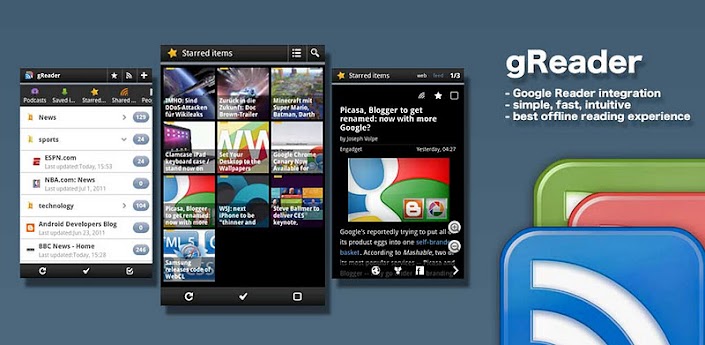
Overview: gReader is an unofficial Google Reader client for Android. Read all your rss/feed news in one place with Google Reader, where keeping up with your favorite websites is as easy as checking your email.

Pro version:
- Support developers
- Ad free version
- Dark Theme (Night Mode)
- Medium Widgets

Features:
  • Google Reader Synchronization: Use gReader at home, at your office, or anywhere you go and keep your feeds, tags and shared items synched in one place.
  • 2-Way Sync: Synchronize your read items between gReader and Google Reader. Keep your articles uptodate.
  • User Interface: Simple, fast and intuitive
  • Offline Reading: Download and read your articles withour internet connection.
  • Themes: gReader support Black, Blue and Dark (Pro) Themes
  • Easy Navigation: Navigate through the articles with intuitice touch gesture.
  • Folders / Tags: Displaying your feeds in folder and tags
  • Subscribing: (Un)subscribing your feeds directly in gReader
  • Auto synchronization: Synchronize your feed automatically for a periodic time
  • Notification: Keep you update with notification
  • Sharing: Share your favorite articles with your friends with a simple single-click via Email, Facebook, Twitter, ...
  • Searching: Let you search for articles in subscriptions
  • Widget: Adds an Unread Count app widget
  • Text Mode View: Reduce articles to text-only version. Easy to read.
  • Inverse Webpage: Inverse the color of the article page
  • Fullscreen mode: Enlarge your reading space
  • Editing Subscriptions/Folders: Edit your subscriptions directly in gReader.
  • People you follow: Folow the feed of your friends
  • Recommended items / sources: View your recommended items or add recommended sources in gReader
  • HTTPS connection: Use Http Secure to get your feeds

What's in this version:
Performance issue: http://greader.co/performance
What's new in v2.7.0
Swipe actions: Readded swipe action with animation (turn off if you encounter issues)
Quick actions: Enlarge click area for quick actions
Bug fixes: Offline Reading issue, force closes on portrait view for tablets, small changes

More Info:
Code: Select all
https://play.google.com/store/apps/details?id=com.noinnion.android.greader.readerpro

Download Instructions:
http://www.MegaShare.com/4173302

Moon+ Reader Pro v1.6.0 apk Update

Moon+ Reader Pro v1.6.0 apk UpdateMoon+ Reader Pro v1.6.0 Update
Requirements: Android OS 1.6+
Overview: Your professional book reader for Android.

Professional book reader with powerful controls & full functions.
*Support online ebook libraries and personal calibre ebook server.
*Read local books with smooth scroll and tons of innovation.
Support txt/html/epub/umd/fb2/zip/OPDS, key features:

Full visual options: line space, font scale, bold, italic, shadow, alpha colors, fading edge etc.
10+ themes embedded, includes Day & Night mode switcher, 20+ background images, 20+ book covers.
Various types of paging: touch screen, volume keys or even camera, search or back keys.
24 customized operations (screen click, swipe gesture, hardware keys), apply to 15 customized events: search, bookmark, themes, navigation, font size and more.
5 auto-scroll modes: rolling blind mode; by pixel, by line or by page. Real-time speed control.
Adjust the brightness by sliding your finger along the left edge of the screen, gesture commands supported.
Intelligent paragraph; indent paragraph; trim unwanted blank spaces options.
“Keep your eyes health” options for long-time reading.
Real page turning effect with customized speed/color/transparent; 5 page flip animations;
My Bookshelf design: Favorites, Downloads, Authors, Tags; self bookcover, search, import supported.
Justified text alignment, hyphenation mode supported.
Highlight, Annotation, Dictionary (Offline & Online), Translation, Share functions all in moon+ ebook reader.
Localized in Bulgarian, Chinese, Czech, Danish, Dutch, English, French, German, Greek, Hungarian, Italian, Korean, Macedonian, Polish, Portuguese, Romanian, Russian, Slovak, Spanish, Swedish, Thai, Turkish and Ukrainian.

Additional benifits in pro version:
#Ad free
#Multi-point touch support
#Shake the phone to speak (Text-to-speech, TTS engine support)
#Option for password protection at startup
#Headset keys control
#Book to desktop shortcut support
#Customer email support

What's in this version:
All versions:
#User Interface mini updates
#Arabic & Hebrew Books support
#Epub covers compatible with old formats
#Dual page mode works smoothly now
#Language packages update, localized in 32 languages
Pro version only
#Reading Statistics function
#More beautiful themes

More Info:
https://play.google.com/store/apps/details?id=com.flyersoft.moonreaderp
Download Instructions:
http://www.MegaShare.com/4178818

Mirror:
http://rapidgator.net/file/11308576/m160n.apk.html